Nikoo Samadi
Starting a new job can be overwhelming. In addition, new hires must learn company policies, complete paperwork, and get familiar with their teams and tools, all while trying to make a good impression. Starting a new job can be overwhelming. Moreover, new hires must learn company policies, complete paperwork, and get familiar with their teams and tools, all while trying to make a good impression. For HR and managers, this process often means repeating the same tasks, answering the same questions, and chasing documents across different system. That’s why many companies are turning to Microsoft 365 Copilot features to make onboarding faster, clearer, and more engaging.
Microsoft 365 Copilot combines the power of AI with the everyday apps employees already use, like Teams, Outlook, Word, and SharePoint. Instead of juggling spreadsheets and emails, HR teams can rely on Copilot to generate onboarding checklists, draft welcome emails, and guide new hires through their first days with ease.
In this blog, we’ll explore how Microsoft 365 Copilot features can simplify and speed up onboarding. You’ll learn which tools make the biggest difference, how to set them up, and what results you can expect when AI becomes part of your onboarding workflow.
The Challenge of Traditional Onboarding
Many organizations still rely on manual, fragmented onboarding processes. HR teams send emails, use spreadsheets, and maintain checklists in silos. New hires struggle to find relevant documents, face delays in access, and receive inconsistent messaging.
These problems aren’t just anecdotal. For example:
- Only about 52 % of new hires say they are satisfied with their onboarding experience, while 32 % find it confusing and 22 % feel it’s disorganized.
- Organizations with strong onboarding programs report 82 % higher new-hire retention and 70 % greater productivity.
- Ineffective onboarding can cost companies in lost productivity, lower engagement, and turnover.
Moreover, qualitative studies highlight that traditional onboarding often lacks structure. A review of formal onboarding programs found wide variations in how organizations support new employees, making comparisons difficult and outcomes unpredictable.
Remote and hybrid work further complicate matters. New hires may feel disconnected when they don’t meet colleagues face to face, and access delays to systems and resources can stall momentum.
In short, traditional approaches often lead to bottlenecks, confusion, and uneven onboarding quality. That’s why companies are now exploring smarter, AI-driven solutions.
Simplify Your Decision with GEM365
Get in touch with GEM365 to guide you through the process and get consultation for free.
How Microsoft 365 Copilot Supports Onboarding
Microsoft 365 Copilot features help automate and personalize every stage of onboarding. Instead of managing dozens of separate tools, HR teams can use Copilot across familiar Microsoft apps to create a smoother experience for new hires.
1. Creating and Managing Onboarding Materials
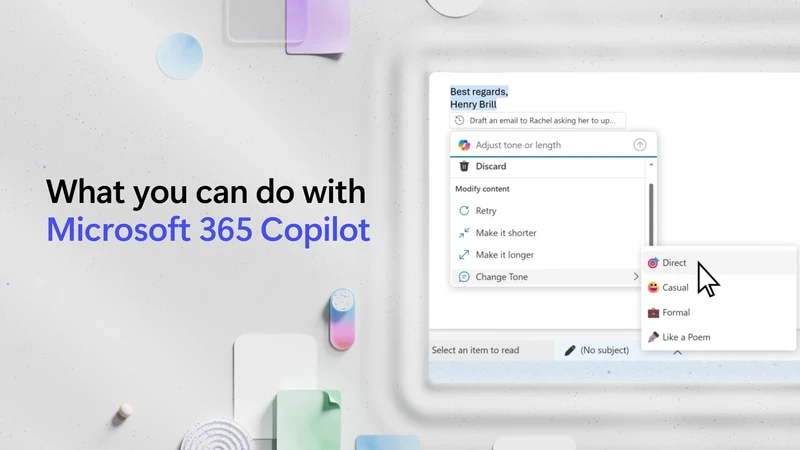
Copilot can generate welcome emails, policy summaries, and training outlines directly in Word or Outlook. For example, an HR manager can ask Copilot to “draft a welcome message for new marketing employees” or “summarize the IT security policy.” This saves time and ensures consistent communication across departments.
According to Microsoft, users who integrate Copilot into everyday tasks have reported productivity gains of 70%, largely because Copilot automates routine writing and data tasks.
2. Organizing Tasks and Checklists in Teams and Planner
During onboarding, new hires often need to complete a series of tasks—from submitting forms to attending orientation meetings. For example, Copilot can automatically build these checklists inside Microsoft Teams or Planner based on HR templates. Managers can then track progress without sending reminder emails.
Moreover, Microsoft’s internal HR teams have already begun using Copilot to assist employees through self-service onboarding chatbots, improving information access and cutting administrative load.
3. Improving Knowledge Access with SharePoint Integration
Copilot connects with SharePoint to locate documents or generate quick summaries of policies and benefits. Instead of searching through folders, a new employee can ask Copilot, ‘What’s the company’s travel policy?’ and get an instant answer. As a result, this reduces confusion and builds confidence early on.
Additionally, a study by Forrester found that organizations using Copilot with Microsoft 365 apps achieved an average productivity improvement valued at $22,000 per employee per year.
4. Supporting HR with Copilot Studio
With Copilot Studio, companies can create HR-specific copilots to answer onboarding questions, guide users through forms, or connect to internal data sources. This means HR teams can focus on building relationships while AI handles repetitive administrative requests.
Together, these tools turn onboarding into a guided, efficient, and engaging experience. Also, check out GEM365 AI features.
Steps to Implement Onboarding with Microsoft 365 Copilot
Implementing Microsoft 365 Copilot features for onboarding doesn’t have to be complicated. In fact, by following a structured approach, HR teams can set up a system that guides new hires effectively while also reducing repetitive tasks.
1. Map Your Current Onboarding Process
First, start by documenting your existing workflow. Next, identify every step a new hire takes, from paperwork to training sessions. Then, highlight bottlenecks, such as delayed approvals or missing resources. By doing this, understanding the process ensures Copilot addresses the areas that need the most support.
2. Identify Automation Opportunities
Next, determine which tasks Copilot can automate. Common examples include:
- Drafting welcome emails
- Scheduling orientation meetings
- Creating task checklists in Teams or Planner
- Providing quick answers to policy questions using SharePoint
Automation reduces manual work and allows HR to focus on high-value interactions.
3. Set Up Copilot Studio and HR Agents
Use Copilot Studio to configure an HR-specific assistant. Train it with internal content such as policy documents, FAQs, and forms. Ensure it can respond to common onboarding questions and guide new hires through each step.
4. Integrate with Microsoft 365 Tools
Link Copilot to Microsoft 365 apps used by your company. For example:
- Teams: For onboarding chatbots and task notifications
- Outlook: For automated email communication
- SharePoint: For document retrieval and knowledge management
This integration ensures a seamless experience for new employees.
5. Train HR and Managers
Provide training sessions so HR teams and managers understand how to use Copilot. Encourage feedback and monitor usage. Early adoption ensures smooth onboarding and identifies areas for improvement.
6. Monitor and Iterate
First, track completion rates, user satisfaction, and efficiency metrics. Then, adjust tasks, templates, or AI responses based on feedback. Finally, continuous refinement helps keep onboarding relevant and effective.
By following these steps, organizations can leverage Microsoft 365 Copilot features to create a structured, automated, and user-friendly onboarding process.
Benefits You Can Measure
Implementing Microsoft 365 Copilot features for onboarding provides measurable improvements for both employees and HR teams. These benefits extend from faster ramp-up times to reduced administrative workloads.
1. Faster Time to Productivity
New hires often take weeks to become fully productive. Copilot accelerates this process by providing instant guidance, task reminders, and access to resources. According to a Forrester Total Economic Impact (TEI) study, organizations using Microsoft 365 Copilot reported an average productivity improvement valued at $22,000 per employee per year.
2. Consistent Onboarding Experience
Copilot ensures that every new hire receives the same quality of onboarding, regardless of department or manager. Automated workflows and AI-generated content reduce inconsistencies that often occur when tasks are handled manually.
3. Reduced Administrative Workload
HR teams spend fewer hours on repetitive tasks like drafting emails, answering common questions, and managing checklists. As a result, Microsoft internal studies show that HR self-service agents powered by Copilot reduced repetitive inquiries by up to 40 %, allowing staff to focus on strategic activities.
4. Higher Employee Engagement and Retention
A smoother onboarding experience improves engagement. Consequently, employees who understand their responsibilities and have access to needed resources are more confident and satisfied. In fact, organizations with structured, automated onboarding programs see 82% higher new-hire retention.
5. Better Knowledge Access and Compliance
By integrating Copilot with SharePoint and Teams, employees can quickly find documents, policies, and training materials. This not only speeds up onboarding but also ensures compliance with company procedures and legal requirements.
Overall, these measurable benefits show how Microsoft 365 Copilot features can transform onboarding from a manual, error-prone process into a streamlined, consistent, and engaging experience.
Microsoft 365 Copilot Onboarding Best Practices
To get the most value from Microsoft 365 Copilot features in onboarding, organizations should follow several best practices. By following these steps, they can ensure efficiency, encourage adoption, and provide a positive experience for new hires.
1. Start Small and Pilot
Begin with a single department or team before rolling out Copilot across the company. A pilot allows you to test workflows, gather feedback, and make improvements before full implementation.
2. Use Real Onboarding Content
Train Copilot with your actual policies, forms, and resources. Generic templates may work initially, but real content ensures that responses are accurate, relevant, and helpful for new hires.
3. Keep Knowledge Sources Updated
Integrate SharePoint, Teams, and Outlook as primary knowledge sources, and update them regularly. Otherwise, outdated content can create confusion and reduce trust in Copilot’s guidance.
4. Monitor Adoption and Gather Feedback
Track how employees interact with Copilot, and collect feedback from both new hires and HR staff. This information helps refine processes, improve AI responses, and identify missing resources.
5. Balance Automation with Human Touch
While Copilot handles repetitive tasks and answers questions efficiently, HR and managers should maintain personal interaction. Onboarding is not only about completing tasks—it’s also about building relationships and company culture.
6. Review and Adjust Regularly
Onboarding needs evolve over time. Therefore, regularly review workflows, AI performance, and employee satisfaction. Then, make iterative improvements to keep the process relevant and effective.
Following these best practices ensures that Microsoft 365 Copilot features deliver consistent, reliable, and measurable benefits to both new hires and HR teams.
Potential Pitfalls and How to Avoid Them
While Microsoft 365 Copilot features can streamline onboarding, organizations may face challenges if they don’t plan carefully. Understanding potential pitfalls helps ensure a smooth implementation.
1. Over-Reliance on Technology
Relying solely on Copilot without reviewing your onboarding processes can create gaps. AI can automate tasks, but it cannot replace strategic planning. HR teams should map workflows and define goals before deploying Copilot.
2. Poor Data Quality or Outdated Documents
Copilot’s effectiveness depends on accurate, up-to-date information. Otherwise, outdated forms, policies, or instructions can mislead new hires and reduce trust in the system. Therefore, regularly review and maintain your knowledge sources.
3. Lack of Change Management
Employees may resist using a new system if they don’t understand its benefits. Providing training, clear instructions, and support ensures adoption and reduces frustration.
4. Neglecting the Human Touch
Onboarding is not just about completing tasks—it also builds relationships and culture. Copilot can handle administrative work, but HR and managers should continue personal interactions, check-ins, and mentorship.
5. Inadequate Monitoring and Feedback
Failing to track performance or collect feedback limits improvement. Therefore, to avoid this, monitor usage, identify gaps, and adjust workflows regularly to maximize efficiency and user satisfaction.
By addressing these pitfalls proactively, organizations can leverage Microsoft 365 Copilot features to create an onboarding process that is efficient, accurate, and engaging.
Final Thoughts
Effective onboarding sets the stage for employee success, engagement, and retention. In particular, Microsoft 365 Copilot features help HR teams streamline repetitive tasks, provide consistent guidance, and deliver a smoother experience for new hires.
By mapping workflows, integrating Copilot with Microsoft 365 apps, and following best practices, organizations can save time, reduce errors, and accelerate productivity. At the same time, maintaining personal interaction ensures that onboarding remains human-centered.
Furthermore, investing in Copilot-powered onboarding is not just a productivity boost—it’s a strategic step toward stronger engagement, better retention, and a more efficient HR operation.
Table of Contents
Read more
- Top Dynamics 365 Sales Features: Transform Sales Performance
- Microsoft 365 vs Office 365: Key Differences Explained
- Business Central Cloud vs On Premises: Which to Choose
- Forbes Reveals the Best Cloud ERP: Here’s Why Business Central Wins
- How the Microsoft Power Apps Platform Transforms Manual Processes
Top Dynamics 365 Sales Features: Transform Sales Performance

Forbes Reveals the Best Cloud ERP: Here’s Why Business Central Wins

How the Microsoft Power Apps Platform Transforms Manual Processes