


Nikoo Samadi
Many companies still manage leads by hand even though Dynamics 365 Sales requires precise data and simple steps. Sellers often make follow-up decisions without following a standard procedure, manually enter data, and qualify leads based on intuition. These steps slow down the sales cycle and make tracking progress challenging.
Dynamics 365 Sales uses artificial intelligence to help with each stage of lead management. The system improves lead records, assigns a score based on the likelihood that a lead will convert, and suggests actions that sellers can take to move a lead forward. These characteristics reduce uncertainty and promote stable, solid teamwork.
This article explains how AI works in Dynamics 365 Sales throughout the lead-management lifecycle. It focuses on how each feature functions and how sellers use it every day. The goal is to give a clear and practical explanation rather than drawing broad conclusions about productivity or the future of sales.
How AI Fits Into The Lead Lifecycle
Lead management in Dynamics 365 Sales follows a clear path: a lead enters the system, is reviewed for quality, and then moves forward or is closed. AI improves this path by supporting each step rather than changing the fundamentals of the seller’s work. This makes Dynamics 365 lead management more consistent and easier to maintain. AI touches each stage of the lifecycle:
1. Lead capture
A lead enters Microsoft Dynamics 365 Sales through a form, import, event, or manual entry. Dynamics 365 Sales AI checks the record, fills in missing fields where possible, and prepares a cleaner profile for the seller.
2. Data enrichment
AI pulls company and contact details from trusted sources. This saves time and gives sellers enough context to make early decisions without searching for information elsewhere.
3. Lead scoring
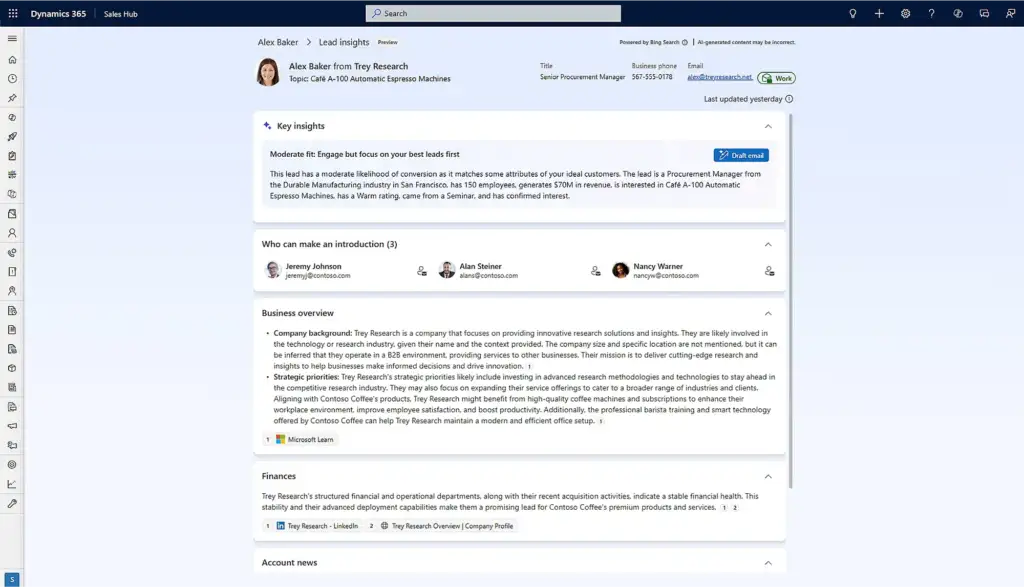
The system uses AI lead scoring to estimate how likely a lead is to convert. It looks at engagement patterns, fit with past opportunities, and any activity captured in the system. The score gives sellers a simple way to set priorities.
4. Qualification support
AI assists with lead qualification automation by reviewing industry, company size, intent markers, and recent actions. This helps the seller decide whether to qualify, nurture, or disqualify the lead while keeping the team aligned on the same standards.
5. Suggested next steps
AI suggests actions based on previous interactions. This may include drafting an email, setting a reminder, or planning the next meeting. These suggestions are part of the broader predictive sales insights built into the platform.
6. Conversion or disqualification
When the lead is ready, the seller converts it to an opportunity. When there is no intent, AI may suggest disqualification to keep the pipeline clear and focused.
Across these steps, AI acts as a guide rather than a replacement. Sellers still make the final decisions, but they work with cleaner data, clearer priorities, and stronger support.
Simplify Your Decision with GEM365
Get in touch with GEM365 to guide you through the process and get consultation for free.
AI Features In Dynamics 365 Sales
AI in Dynamics 365 Sales supports lead management by handling tasks that often take time or depend on guesswork. Each feature has a clear purpose, uses specific inputs, and produces results that help sellers act with more confidence. Understanding how these tools work in daily practice is essential for steady and structured Dynamics 365 lead management.
Below is a breakdown of the core AI capabilities, explained in simple terms so sellers and managers can understand how they operate inside the system.
1. AI Lead Scoring
AI lead scoring estimates how likely a lead is to convert by comparing it to patterns found in past sales. Instead of relying on intuition alone, Dynamics 365 Sales AI reviews the data that shaped previous wins and losses. This gives sellers a clear starting point for prioritizing their work. The scoring model reviews information such as:
- Outcomes from earlier opportunities
- Industry and company size
- Job role and seniority
- Email openings, link clicks, and form activity
- Notes and interactions logged in the timeline
Sellers see the outcome as a simple score, such as 82/100, displayed on the lead record and in list views. This feature helps reduce uncertainty at the top of the funnel. It provides a consistent signal that supports early decision-making and improves the focus of outreach efforts.
2. Sales Qualification Agent
The Sales Qualification Agent reviews each lead’s fit and intent before the seller qualifies it. It checks essential details, highlights gaps, and provides a structured recommendation. This supports lead qualification automation without removing control from the seller. The agent reviews factors including:
- Industry match and relevance
- Company size
- The role’s influence on buying decisions
- Recent activity or inactivity
- Missing fields that may slow qualification
The system provides a short recommendation, such as “Likely to qualify” or “Low fit based on profile.” This results in more consistent qualification decisions. Teams benefit from a shared standard while still relying on human judgement where it matters.
3. AI-Powered Data Enrichment
Many leads enter Microsoft Dynamics 365 Sales with incomplete information. AI enrichment fills in missing details by matching the record with available business data. This improves accuracy without requiring sellers to research basic information on their own. AI may fill in or confirm fields such as:
- Website
- Industry
- Number of employees
- Company size
- Job role
Sellers see a more complete record moments after the lead enters the system. Good enrichment strengthens the rest of the workflow. When lead data is accurate, scoring and qualification become more reliable, and follow-up steps are easier to plan.
4. Suggested Actions (Copilot)
Copilot reviews the lead’s history and timing to suggest the next action. These suggestions are simple and help keep the process steady. They also act as part of the predictive sales insights available in the system. Common suggestions include:
- Sending a follow-up email
- Setting a reminder
- Scheduling a call
- Reviewing recent activity
- Logging notes
The suggestions appear on the lead record, and the seller can act on them with one click. This helps prevent leads from going inactive. It also supports a consistent pace of communication, which is important for leads that need steady follow-up.
5. Automated Disqualification Support
AI can also highlight leads that show low intent or poor fit. This does not remove the seller’s authority but makes it easier to manage a clean and focused pipeline. The system reviews signals such as:
- Invalid contact details
- No response over time
- Clear mismatch with your ideal profile
- Repeated inactivity or ignored attempts
Sellers may see a prompt “Consider disqualifying this lead due to low intent.” Regular use of this feature helps maintain healthier lists, reduces noise, and keeps the pipeline easier to manage.
6. Analytics and Insight Generation
AI also studies patterns across all leads to surface insights that support better decisions. These insights are simple and focus on the points that often need attention. Insights may include:
- Which lead sources produce high-scoring contacts
- Early signs of leads that may stall
- Changes in qualification behavior
- Shifts in lead quality across campaigns
These insights appear in dashboards and summaries inside Dynamics 365 Sales. They help teams understand what is working and where small adjustments can improve results. Instead of scanning long reports, sellers and managers receive focused signals that guide next steps.
What Good Lead Data Looks Like For AI To Work
AI in Dynamics 365 Sales depends on the quality of the data it receives. Clean and complete records allow scoring, qualification, and recommendations to work as intended. When key fields are missing or inconsistent, the system has less to work with and the results become less reliable. Understanding what counts as “good data” helps teams get more value from the tools they already have.
AI models in Dynamics 365 lead management rely on the same fundamentals that guide human judgement. Sellers look at industry, role, company size, and engagement patterns before making decisions. AI uses the same signals, but it evaluates them across larger volumes of data and with more consistency. Because of this, strong inputs matter.
1. Clear Contact and Company Details
Basic information forms the foundation of all AI work. When a lead enters the system, the details should be accurate and consistent. Important fields include:
- Full name
- Valid email address
- Company name
- Website
- Job role or title
These fields allow enrichment tools to match the lead with external information. They also help Dynamics 365 Sales AI make better decisions about fit and intent.
2. Accurate Firmographic Information
Firmographic data improves the accuracy of scoring and qualification. AI uses these fields to determine whether the lead resembles successful contacts from the past. Useful firmographic fields include:
- Industry
- Number of employees
- Location
- Annual revenue (when available)
Even when sellers do not use this data directly, AI depends on these fields to compare leads against your historical results.
3. Engagement and Activity History
AI also reviews how a lead interacts with the organization. This includes digital actions and any notes or tasks logged by the seller. Examples include:
- Email opens and link clicks
- Form submissions
- Event attendance
- Meeting notes
- Call outcomes
The more activity captured in the system, the more accurate the recommendations and predictive sales insights become. This information helps AI measure intent and decide whether a lead is progressing or losing interest.
4. Consistent Qualification and Status Updates
Good data also comes from steady updating. When sellers qualify or disqualify leads, those decisions shape future scoring models. Inconsistent updates can distort the results. Helpful habits include:
- Marking leads as qualified or disqualified promptly
- Adding short notes about the reason
- Updating job roles or industry fields if they change
- Logging follow-ups rather than keeping them offline
This improves the accuracy of lead qualification automation and the suggestions that follow.
5. Clean and Non-Duplicated Records
Duplicates, outdated entries, or incomplete records weaken the system. AI may score the wrong contact, misread intent, or fail to enrich the record.
A simple review each week helps avoid these issues. Removing duplicates and correcting obvious errors also improves reporting accuracy and reduces noise in the pipeline.
Example Workflow: From Form Fill To Opportunity
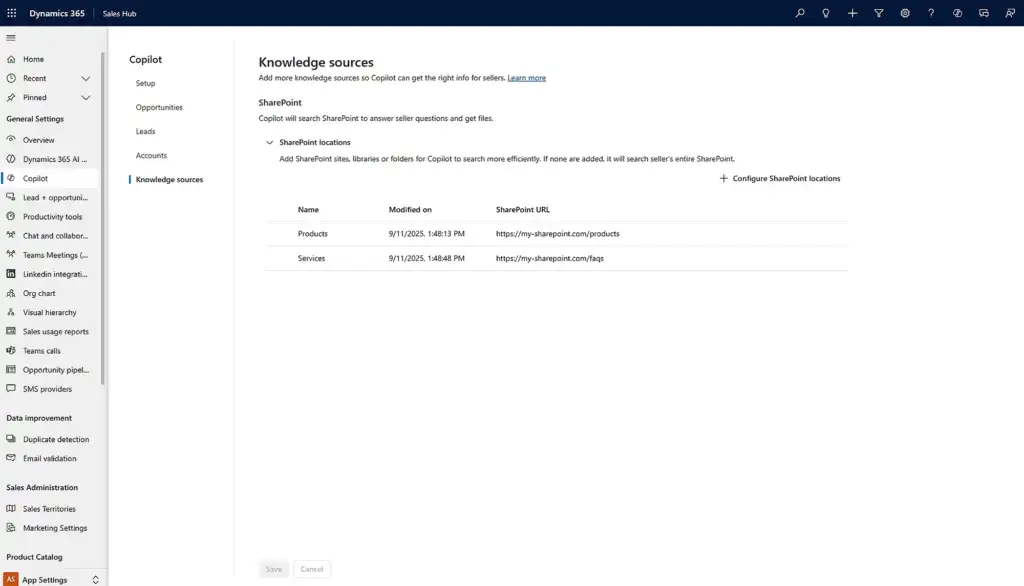
A lead’s journey through Dynamics 365 Sales becomes easier to understand when you see how AI supports each step. The example below follows a simple scenario: a potential customer fills out a form on your website, and the sales team handles the lead from first contact to qualification. This walkthrough shows what the seller sees, what the system does in the background, and how each action affects the next step.
1. The Lead Enters the System
A visitor completes a form requesting product information. The form sends the details to Dynamics 365 Sales, where the record is created automatically. At this point, the record may contain only a name, email address, and company.
AI actions:
- Checks if the email address is valid
- Enriches missing fields such as company website or industry
- Compares the data with known duplicates
What the seller sees: a cleaner, more complete lead record without needing to search for basic information.
2. The System Enriches the Data
AI enrichment adds firmographic information such as company size and location. These fields help future scoring and qualification work. The seller does not need to confirm every detail, but they can edit fields that look incorrect.
AI actions:
- Adds industry and company size
- Fills in missing website details
- Updates role information when available
What the seller sees: A better starting point for understanding who the lead is and whether they fit the target profile.
3. The Lead Receives an AI Score
Next, the system assigns a predictive lead score. This score is based on patterns found in past wins and losses, as well as early engagement activity. The seller uses this score to decide how soon to follow up.
AI actions:
- Compares the lead to historical conversion patterns
- Evaluates fit and early behavior
- Calculates a score, such as 78/100
What the seller sees: A numeric score that helps set priorities for outreach.
4. The Qualification Agent Reviews the Lead
The Sales Qualification Agent checks the lead against your ideal customer profile. If clear details are missing, the agent highlights them. If the lead shows strong fit or intent, the agent notes that as well.
AI actions:
- Checks industry relevance
- Checks company size and role match
- Reviews timeline activity
- Looks for any indicators of intent
What the seller sees: A recommendation such as “Likely to qualify” or “Low fit based on profile.”
5. Copilot Suggests the Next Step
After reviewing the lead score and recommendation, the seller considers follow-up options. Copilot suggests a simple action to maintain momentum. This reduces the chance of the lead going quiet.
AI actions:
- Reviews the timing of the form submission
- Checks past interactions with similar leads
- Proposes a small, targeted action
What the seller sees: A suggestion such as “Send a welcome email” or “Schedule a follow-up call.”
The seller can send a drafted email generated by Copilot, or write their own.
6. The Lead Responds
The lead replies to the email or books a call. The system logs this activity and updates the timeline automatically. Engagement like this strengthens future scoring and improves qualification confidence.
AI actions:
- Logs the email response
- Updates engagement indicators
- Increases the likelihood of qualification
What the seller sees: A clear view of the response in the timeline.
7. The Seller Qualifies the Lead
If the conversation goes well and the lead meets your criteria, the seller converts the lead into an opportunity. The qualification agent’s earlier suggestions help speed up this step, but the seller makes the final decision.
AI actions:
- Checks that key fields are complete
- Updates related scoring models
- Prepares the opportunity record
What the seller sees: A clean handoff from lead to opportunity, with all prior activity carried over.
Benefits and Outcomes
AI in Dynamics 365 Sales supports lead management by improving the accuracy, speed, and consistency of routine tasks. The benefits come from small but steady changes in daily work rather than dramatic shifts in strategy. When the system handles enrichment, scoring, and early review, sellers gain more time and clearer direction. This section outlines the practical outcomes teams notice when using AI across the lead lifecycle.
1. More Consistent Qualification Decisions
Without AI, qualification varies from one seller to another. Some rely on past experience, while others focus on the most recent interaction. With features like scoring and the Sales Qualification Agent, the team gains a shared standard. Sellers still make the final decision, but they do so with clearer data and a more predictable workflow. This creates a more stable pipeline and reduces the risk of overlooking strong leads.
2. Better Use of Time
AI reduces manual work by completing tasks that often slow sellers down. Enrichment fills in missing details, and suggested actions reduce the time spent planning follow-ups. This leads to more time spent speaking with qualified contacts and less time sorting through records. The effect is gradual, but teams notice that their schedules shift toward more meaningful activities.
3. Higher-Quality Lead Records
When AI enriches incoming leads and highlights missing information, the result is a cleaner and more reliable database. Good data improves other parts of Dynamics 365 lead management, including reporting and segmentation. It also reduces the amount of rework needed when a lead progresses to an opportunity.
4. Clearer Priorities for Sellers
Predictive scoring and qualification suggestions help sellers focus on contacts that are more likely to move forward. Instead of reviewing every lead manually, they can begin with those that show stronger intent or fit. This focus improves the rhythm of daily work and supports steady progress through the pipeline.
5. A Healthier Pipeline
AI prompts sellers to disqualify leads that show low intent or do not match the ideal profile. This keeps the pipeline manageable and reduces noise in reports. A smaller pipeline is not a disadvantage when it reflects real opportunity. It makes forecasting easier and gives teams a more accurate view of their progress.
6. Stronger Insight Into Lead Behavior
AI-driven insights highlight trends and patterns that may not be obvious in daily work. These signals help sales managers understand which sources produce strong leads and where friction occurs in the lifecycle. This supports decisions about campaigns, handoff processes, and team alignment without requiring long data analysis sessions.
7. A Smoother Hand-Off to Opportunities
When AI supports early-stage tasks, opportunity records carry more accurate information. Sellers begin the opportunity stage with clear details and consistent notes, which makes planning conversations easier. This improves the quality of the early sales cycle and reduces the need to revisit basic discovery questions.
Final Thoughts
AI in Dynamics 365 Sales supports lead management by strengthening the structure and consistency of daily work. It enriches new records, highlights strong leads, and suggests steady follow-up actions. These features do not replace the seller. Instead, they help reduce manual tasks and make it easier to move leads through a clear and predictable process.
When the underlying data is accurate and teams follow shared standards, AI becomes a reliable part of the workflow. It provides guidance where it adds value and stays out of the way where human judgement matters more. Used this way, AI helps sales teams stay organized, focus on quality leads, and maintain a cleaner pipeline without changing how they sell.
The most effective results come from steady use, clear processes, and a practical understanding of how each feature works. With these elements in place, organizations can depend on Microsoft Dynamics 365 Sales to support strong lead management at every stage.
Table of Contents
Read more

Forbes Reveals the Best Cloud ERP: Here’s Why Business Central Wins

How the Microsoft Power Apps Platform Transforms Manual Processes

Top Power Automate Workflows Every Business Should Use in 2025


